- AI compresses technical SEO's data-gathering phase — log analysis, schema generation, redirect triage, alt-text drafting.
- AI diagnoses Core Web Vitals root causes; it does not deploy the fixes.
- Render strategy, migration architecture, and hreflang decisions remain practitioner work.
- Best tool stack: Sitebulb (audit), Screaming Frog with AI integration (crawl + on-page), GSC (ground truth).
Knowing how to use AI for technical SEO comes down to one distinction: which audit steps AI handles, and which still need a practitioner.
Here’s what you’ll learn:
- How AI compresses log file analysis from hours to minutes
- Which schema types AI generates reliably and how to validate them
- How to triage broken links by traffic impact with a single prompt
- How AI diagnoses Core Web Vitals root causes without writing a fix
- What AI cannot do in a technical audit, and why that matters
In the audits I run on sites between 20,000 and 200,000 URLs, data-gathering tasks typically account for more than half the total hours: pulling log files, generating schema, triaging redirect chains, writing alt text, and reading Lighthouse traces. All five of those steps compress significantly with AI.
The decision layer did not shrink at all. It became the only layer that still required my full attention. That is how to use AI for technical SEO without overselling it.
How to use AI for technical SEO
Direct answer: Feed AI the data-gathering tasks in your audit. Log file analysis, schema markup generation, broken link triage, alt-text drafting, and Core Web Vitals diagnosis all compress with AI assistance. What does not compress: render strategy decisions, migration architecture, hreflang for ambiguous markets, and any edge SEO configuration choices. AI shortens the export-and-diagnose phase. The practitioner still owns every deploy decision.
The five tasks below are the ones worth setting up as repeatable AI-assisted workflows. Each has a prompt template or a tool configuration that makes it systematic rather than one-off. You can see how these fit into the broader framework in the AI for Technical SEO pillar.
One signal worth noting early: Googlebot’s crawl of client-side-rendered URLs is delayed by hours to days compared to server-rendered pages, per Google’s JavaScript SEO documentation. That gap is exactly why log file analysis and render-strategy decisions stay separate in the workflow below: AI handles the pattern detection; the practitioner handles the rendering call.
The audit layers AI handles vs what requires a practitioner
Before running any AI-assisted workflow, it helps to be precise about what AI is and is not doing in a technical audit.
| AI handles | Practitioner decides |
|---|---|
| Log file pattern detection and crawl anomaly surfacing | Render strategy (SSR vs CSR vs ISR) |
| Schema markup generation and JSON-LD output | Migration architecture and canonical structure |
| Broken link identification and redirect chain flagging | Hreflang implementation for ambiguous markets |
| Alt text drafting from filenames and surrounding headings | Edge SEO configuration (Cloudflare Workers, IndexNow setup) |
| Core Web Vitals root-cause identification from Lighthouse traces | Final deploy decision on any of the above |
| Sitemap regeneration from URL lists | robots.txt change decisions affecting crawl budget |
The pattern is consistent. AI handles tasks where the input is structured data (logs, crawl exports, HTML, image lists) and the output is a first draft or a sorted priority list.
The practitioner handles tasks where the output is a decision that changes what Googlebot sees or how the site renders.
With that framing in place, here are the five tasks worth automating when using AI for technical SEO.
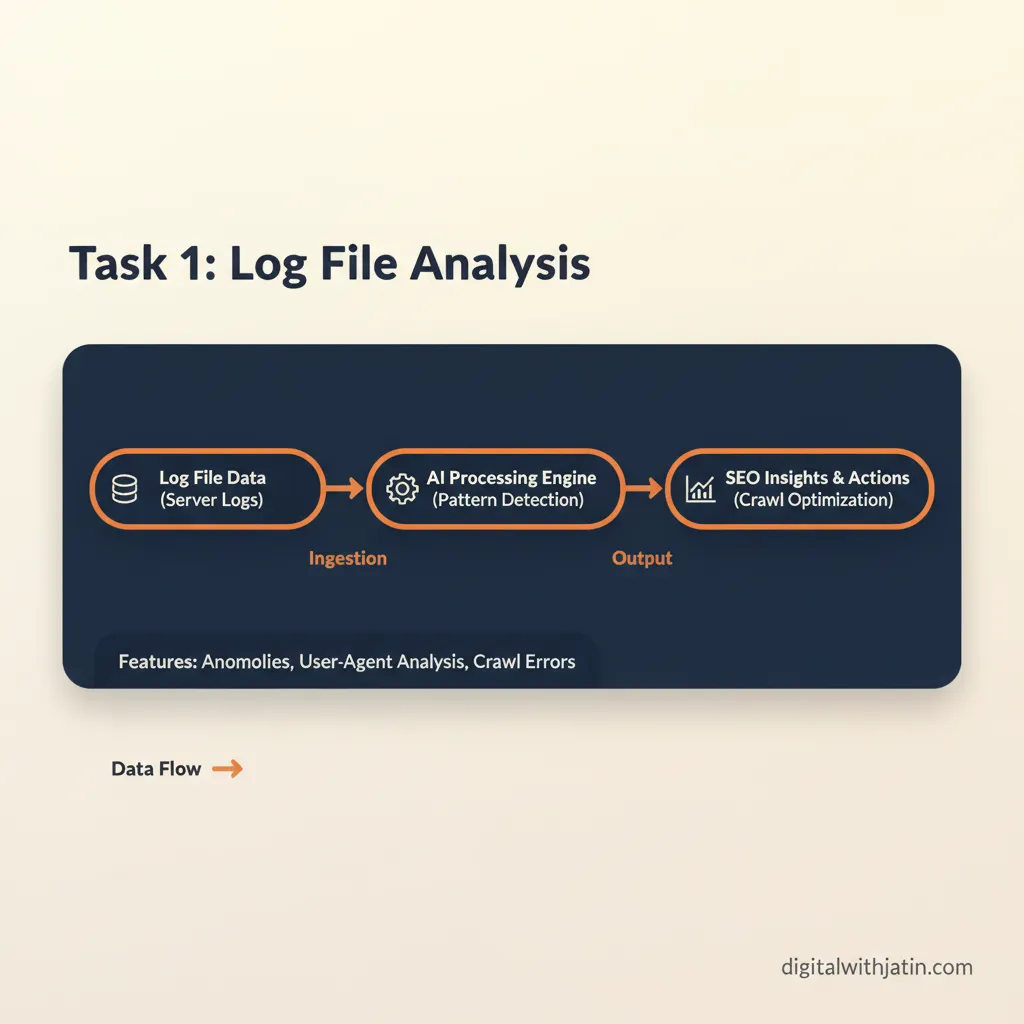
Task 1: Log file analysis
Log file analysis is the most time-compressed task in this list. Raw server logs contain every request Googlebot made to your site.
Reading them manually means filtering gigabytes of data, separating bot traffic from user traffic, and then building a frequency table by URL. That is a significant undertaking for a large site.
AI shortens this considerably. Export your server logs from Cloudflare Observability or your hosting provider’s log stream. Feed the export to Sitebulb’s log analysis feature or to a custom Claude prompt. A prompt that works consistently:
You are a technical SEO analyst. I'm giving you a server log export.
Identify: (1) which URLs Googlebot requests most often, (2) URLs with
declining crawl frequency over the last 30 days, (3) parameter URLs
that appear to be wasting crawl budget, and (4) any URLs returning
non-200 status codes that Googlebot is still requesting.
Format the output as a prioritized list with a one-line reason for each.

Log data:
[paste log export here]
The output gives you a triage list, not a finished audit. You still decide which crawl budget issues to fix and whether any indexability changes need to follow. But the data layer is done.
Task 2: Schema generation and validation
Schema markup generation is one of the highest-confidence AI tasks in technical SEO. JSON-LD follows a defined spec.
AI models trained on large amounts of structured data generate valid JSON-LD reliably, especially for common schema types like Article, FAQPage, HowTo, and Product. This is a practical way to use AI for technical SEO without needing to memorize the full Schema.org vocabulary.
The workflow is straightforward. Paste the page title, content type, and body text into Claude or ChatGPT with this prompt:
Generate valid JSON-LD schema markup for the following page.
Schema types needed: [Article, FAQPage, or HowTo - pick what applies].
Return only the JSON-LD block, formatted for placement in a <head> tag.
Do not include explanatory text outside the JSON-LD block.

Page title: [title]
Content type: [article / how-to guide / product page / FAQ]
Body content:
[paste page content]
Copy the output and validate it with Google’s Rich Results Test before deploying. This step is not optional.
AI-generated schema occasionally has field mismatches or deprecated properties that a schema validator catches immediately. The validation step takes 60 seconds. Skipping it and deploying broken JSON-LD costs more time than the validation saves.
Task 3: Broken links and redirect chains
Screaming Frog is the standard tool for this. Run a full crawl, then filter for 4xx response codes and redirect chains with three or more hops. Export both lists as a CSV.
The problem with raw exports is volume. A site with ten thousand pages can return hundreds of broken links. Working through the full list top to bottom is inefficient.
Feed the export to an LLM for prioritization instead:
You are a technical SEO specialist. I'm giving you two CSV exports:
one for broken links (4xx) and one for redirect chains (3+ hops).
Sort the broken links by estimated traffic impact using anchor text
and referring page URL as signals. Flag any redirect chains over 2 hops.
Return a prioritized list with columns: URL, issue type, priority (high/medium/low), reason.

[paste CSV data]
Work the priority list. High-priority broken links (linked from high-traffic pages with descriptive anchor text) get fixed first. Low-priority items get batched. Redirect chains over two hops get flagged for cleanup in the next deploy window.
This does not eliminate the manual work. It reorganizes it so your attention goes to the highest-impact items first.
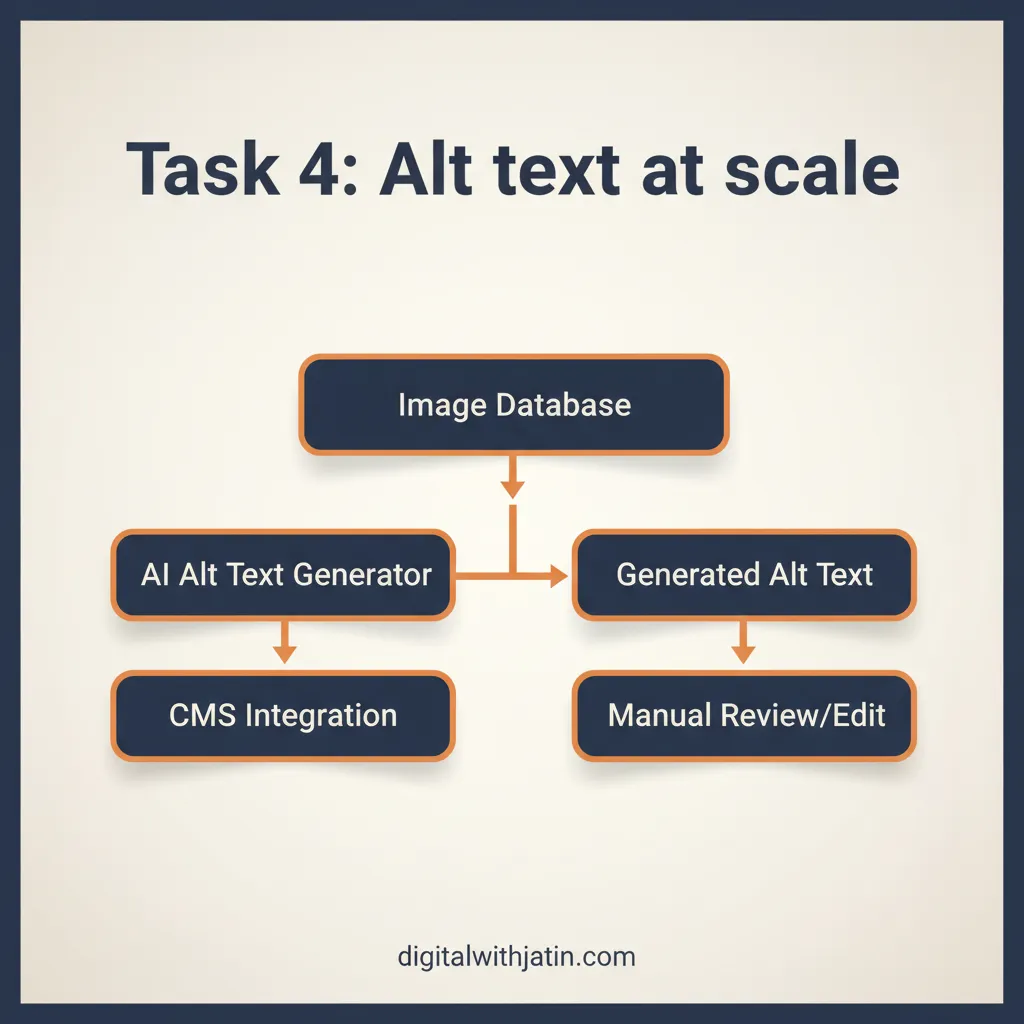
Task 4: Alt text at scale
Missing alt text is a common crawl finding on sites with large image libraries. Screaming Frog surfaces images without alt attributes in the Images tab.
Export the list, which typically includes the image URL, the page it appears on, and any surrounding anchor or heading text.
Feed that export to Claude with the surrounding H2 as context:
Write a descriptive alt text under 125 characters for each image below.
Use the surrounding heading as context for what the image likely shows.
Do not start alt text with "Image of" or "Photo of."
Return the results as a table with columns: image filename, suggested alt text.

Images:
[filename] | [surrounding H2 text]
[filename] | [surrounding H2 text]
Review the output before committing. AI drafts faster than any manual process for this task, but it cannot see the images.
If the filename is generic (e.g., “IMG_4821.jpg”) and the H2 is broad, the alt text will be generic too. Flag those for manual review. The batch where filenames are descriptive and headings are specific will be close to production-ready. On alt-text batches I’ve run across image libraries of 300 to 800 images, the descriptive-filename batches are typically production-ready with a light review pass; generic-filename batches need case-by-case attention.
Task 5: Core Web Vitals diagnosis
INP became a Core Web Vital in March 2024, replacing FID. It measures responsiveness: how long the browser takes to respond to a user interaction.
Poor INP is often the hardest Core Web Vitals issue to diagnose because it requires tracing specific interactions rather than reading a single page-level score.
Run Lighthouse on your target URL and export the performance trace. Feed it to Claude or ChatGPT:
Identify the top 3 causes of poor INP on this page based on the Lighthouse trace below.
For each cause, name the specific interaction type, the estimated delay in milliseconds,
and whether the cause appears to be first-party or third-party code.

Lighthouse trace:
[paste trace output]
The model will identify specific interactions, usually long tasks in event handlers or render-blocking third-party scripts. The diagnosis is useful and generally accurate.
The fix requires a developer to change code and redeploy. AI does not write the patch or push it. That step is yours.
For LCP and CLS, the same pattern applies: Lighthouse trace in, diagnosis out, developer fixes and redeploys. AI compresses diagnosis time significantly. It does not replace the code changes.
What AI cannot fix in technical SEO
This section matters as much as the five tasks above, because overfitting to AI tooling on decisions that require practitioner judgment produces bad outcomes. The sibling post on what AI simplifies in technical SEO work covers the boundary in more detail; here is the short version.
| AI task (from above) | What the practitioner must still decide |
|---|---|
| Log file pattern detection | Render strategy: SSR, CSR, or ISR |
| Schema draft and JSON-LD output | Migration architecture and canonical structure |
| Hreflang syntax generation | Which market gets which content |
| Redirect chain identification | Edge SEO config (Cloudflare Workers, IndexNow) |
Render strategy decisions. Whether a site should use server-side rendering, client-side rendering, or incremental static regeneration is a decision with significant crawl budget and indexability implications. Google’s JavaScript SEO documentation explains how Googlebot handles JavaScript rendering, but the architecture decision is not something you feed to an LLM and accept the output. The variables (build system, team capacity, content freshness requirements) are too specific to the site.
Migration architecture. URL structure changes, subdomain consolidations, and platform migrations require redirect map planning, canonical decisions, and timing coordination. AI can help generate a redirect map from an existing URL list. It cannot design the migration architecture or assess the risk of a specific redirect chain decision.
Hreflang for ambiguous markets. Hreflang is technically precise but contextually complex. When a market spans multiple languages or regions with overlapping content (Spanish for Mexico vs Spain, French for France vs Canada), the tagging decisions require understanding of actual user behavior, not just ISO codes. AI generates syntactically correct hreflang tags. It cannot decide which content belongs to which market.
Edge SEO configuration. Cloudflare Workers and similar edge platforms allow redirect logic, header injection, and robots.txt manipulation at the CDN layer. These configurations have significant SEO implications and can affect URL inspection results in GSC. The configuration decisions require someone who understands both the CDN behavior and the downstream crawl effects.
FAQ
Can AI fix Core Web Vitals issues?
AI can diagnose them. A Lighthouse trace fed to Claude or ChatGPT will identify the specific interaction causing poor INP or LCP. The diagnosis is useful. The fix requires a developer to change code and redeploy.
Which AI tools are best for technical SEO audits?
Sitebulb for audit-grade crawl reports with AI-generated summaries. Screaming Frog with JavaScript rendering for classic crawl and on-page checks. Google Search Console (URL Inspection API) as ground truth for Googlebot’s view of any URL.
Does AI replace a technical SEO audit?
No. AI compresses the data-gathering phase so the practitioner spends time on decisions rather than exports. The decision layer (render strategy, migration planning, hreflang) does not shrink. It becomes the practitioner’s primary output.
The data-gathering phase of a technical audit compresses with AI; the decision layer does not. That is how to use AI for technical SEO without overfitting to the tooling.
If you want to map this to your specific site and audit workflow, the AI SEO automation service covers technical audit workflows as part of the engagement.